


Somebody on your team spins up a virtual machine in a region your company never approved. Another engineer creates a storage account with public access left on. Nobody did anything malicious. They just clicked through the portal the way anyone would. Six months later, an auditor finds both.
This is the problem Azure Policy exists to solve. Access control would not have stopped either one, and billing alerts only tell you after the fact. What you need is a way to define what is allowed to exist in your cloud environment in the first place.
This guide covers what Azure Policy is, how it actually works under the hood, the effects you can apply, how initiatives and remediation fit in, and where teams tend to go wrong. If you manage Azure subscriptions in any capacity, this is worth 15 minutes of your time.
What is Azure Policy?
Azure Policy is a governance service built into Microsoft Azure that lets you define rules for your resources and then enforces those rules automatically. A rule might say “no virtual machines outside East US and West US,” or “every resource must carry a cost-center tag,” or “storage accounts cannot allow public blob access.” Once a policy is assigned, Azure evaluates every resource against it and either blocks non-compliant requests, flags them for review, or fixes them on the spot.
The service is free. There is no charge for creating, assigning, or evaluating policies, which is unusual for something this useful. (A few adjacent capabilities, like machine configuration for servers running outside Azure, do carry costs, but the core service does not.)
The simplest way to think about it: role-based access control decides who can do things in Azure. Azure Policy decides what can be done at all, regardless of who is doing it. An Owner with full permissions still cannot create a VM in a blocked region if a Deny policy is in place. That distinction matters more than most people realize, and we will come back to it.
How Azure Policy works
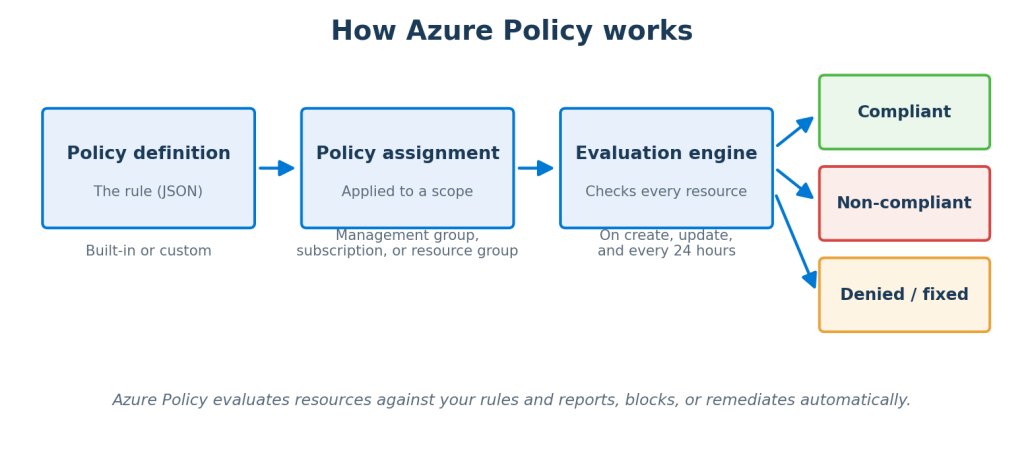
Four building blocks do all the work. Get these straight and everything else in the service makes sense.
Policy definitions
A policy definition is the rule itself, written in JSON. It has two halves: a condition (what to look for) and an effect (what to do when the condition matches). Here is a stripped-down example that blocks resources outside two regions:
json
{
  "if": {
    "not": {
      "field": "location",
      "in": ["eastus", "westus"]
    }
  },
  "then": {
    "effect": "deny"
  }
}
You rarely need to write these from scratch. Azure ships with well over a thousand built-in definitions covering regions, tags, SKUs, networking, encryption, and diagnostics. Most teams get 80% of the way there with built-ins and write custom definitions only for rules specific to their business.
Policy assignments
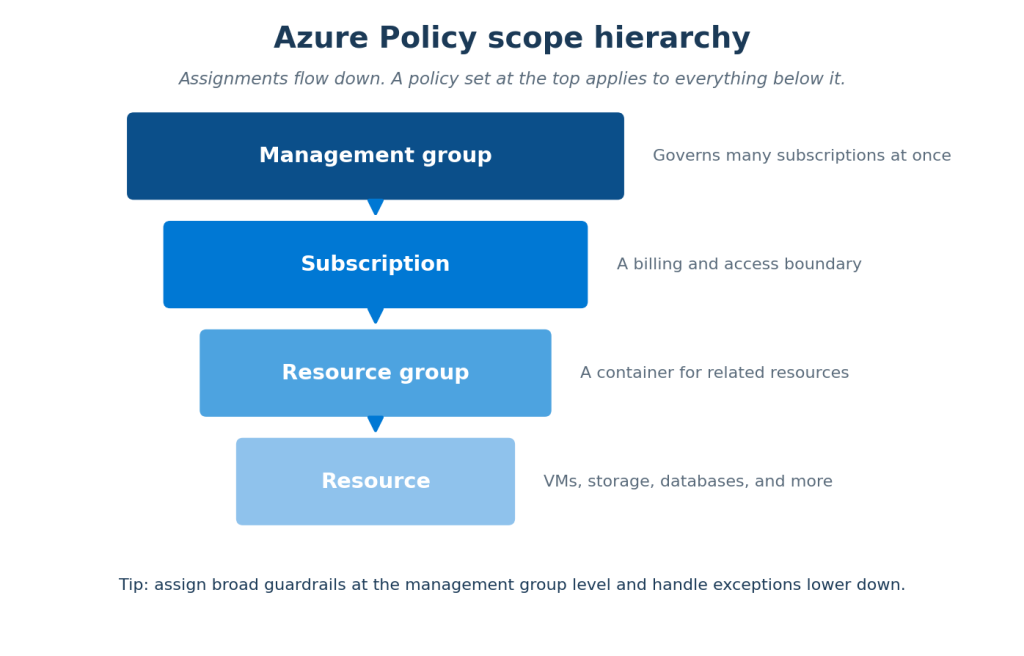
A definition does nothing until you assign it to a scope. The assignment is what says “apply this rule here.” Scopes follow the Azure resource hierarchy: management group, subscription, resource group, or individual resource. Assign at a management group and the rule cascades to every subscription and resource underneath it.
You can also carve out exclusions within an assignment, and since exemptions were introduced, you can grant time-bound waivers for specific resources without touching the assignment itself. Exemptions are the cleaner option because they leave an audit trail and can expire automatically.
Parameters
Parameters keep you from writing twenty nearly identical definitions. One “allowed locations” definition with a location parameter can be assigned to the production management group with ["eastus"] and to the dev subscription with ["eastus", "westus", "centralus"]. Same rule, different values, far less maintenance.
The evaluation engine
Azure evaluates resources against assigned policies at several points: when a resource is created or updated, when a new policy is assigned to a scope, roughly once every 24 hours as a standing compliance sweep, and whenever you trigger an on-demand scan. Results land in the compliance dashboard, where each assignment shows a compliance percentage and a list of the specific resources that fail.
One thing that surprises people: evaluation is not instant across an entire estate. A newly assigned policy can take around 30 minutes to take effect, and the full compliance picture for existing resources fills in over the following scan cycle. Plan rollouts accordingly.
Policy effects: what happens when a rule matches
The effect is where a policy gets its teeth. These are the ones you will actually use:
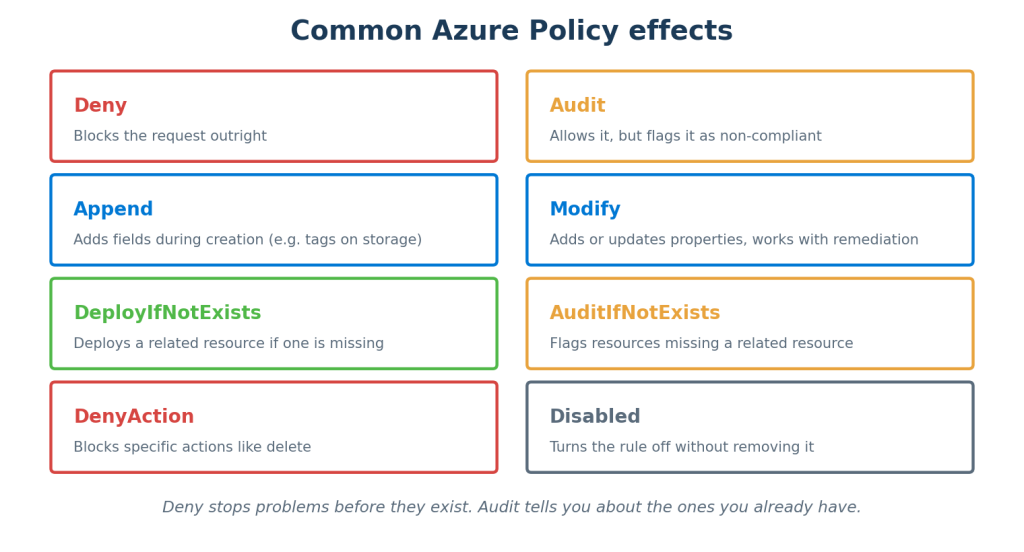
Deny blocks the request. The user gets an error at deployment time and the resource is never created. This is the effect people picture when they hear “policy,” and it is also the one to use most carefully, because a badly scoped Deny can break legitimate deployments across an entire organization in one afternoon.
Audit allows the action but records the resource as non-compliant. This is the right starting point for almost every new policy. Run it in audit mode for a few weeks, see what it would have caught, then flip to Deny once you trust it.
Append adds fields to a resource during creation. The classic example is appending an IP restriction to a storage account.
Modify adds, updates, or removes properties and tags, and it pairs with remediation tasks so you can fix existing resources, not just new ones. If your goal is “every resource gets an environment tag,” Modify plus remediation is how you get there without asking anyone to do anything.
DeployIfNotExists checks whether a related resource exists and deploys it if not. This is how organizations guarantee that every VM has diagnostic settings or that every SQL database has auditing turned on. It requires a managed identity with the right permissions, which trips people up on first use.
AuditIfNotExists is the read-only sibling: it flags resources that are missing the related resource but deploys nothing.
DenyAction blocks specific actions, most usefully delete operations, which gives you a lightweight way to protect critical resources.
Disabled switches the rule off without deleting anything, which is handy for testing and for parameterized definitions where some assignments should be dormant.
My honest advice after seeing how this plays out in real environments: default to Audit, earn your way to Deny, and treat DeployIfNotExists as the workhorse for anything security-related. Teams that start with aggressive Deny policies tend to generate a flood of support tickets and then quietly disable everything, which is worse than having no policies at all.
Initiatives: grouping policies that belong together
An initiative (Microsoft also calls it a policy set) bundles multiple policy definitions into a single assignable unit. Instead of assigning 40 individual security policies to your production management group and tracking 40 compliance scores, you assign one initiative and get one aggregate score.
This is where compliance work gets practical. Azure ships built-in regulatory compliance initiatives that map policies to the controls in frameworks like ISO 27001, NIST SP 800-53, PCI DSS, HIPAA, and CIS benchmarks. Assign the ISO 27001 initiative and the compliance dashboard shows you, control by control, where your environment stands. It will not make you certified on its own (auditors care about process, not just configuration), but it turns “are we compliant?” from a quarterly panic into a dashboard you can check on a Tuesday.
The Microsoft cloud security benchmark initiative deserves a specific mention. It is assigned by default when you enable Microsoft Defender for Cloud, and it is the source of most of the security recommendations you see there. A lot of people use Defender for Cloud daily without realizing Azure Policy is the engine underneath.
Remediation: fixing what already exists
Deny only helps with resources created after the policy exists. Every real environment has a backlog of resources built before anyone thought about governance. Remediation tasks handle that backlog.
For policies using Modify or DeployIfNotExists, you can create a remediation task that walks through existing non-compliant resources and applies the fix. The task runs under a managed identity, so it needs role assignments that match what the fix requires (Contributor on the scope for deploying diagnostic settings, for example). Set the identity up wrong and the task fails quietly, and you will spend an hour wondering why nothing happened.
A sensible remediation rollout looks like this: assign in audit mode, review the non-compliant list, remediate a small resource group as a test, then remediate the full scope. Skipping the test step on a policy that modifies hundreds of resources is a bet you do not need to make.
Azure Policy vs RBAC: different questions, both necessary
This comparison confuses newcomers constantly, so here it is plainly.
RBAC answers “can this person perform this operation?” It is about identities and permissions. A user with the Contributor role can create resources; a user with Reader cannot.
Azure Policy answers “is this resource configuration allowed to exist?” It ignores who is asking. The CTO and an intern hit the same Deny policy identically.
They also fail differently. RBAC is deny by default: you can do nothing until a role grants it. Azure Policy is allow by default: everything is permitted until a policy restricts it. You need both, and neither substitutes for the other. RBAC without Policy means authorized people can still build non-compliant resources. Policy without RBAC means anyone can attempt anything and you are relying on rules alone to catch it.
Worth knowing for planning purposes: Azure Blueprints, the older service that packaged policies, role assignments, and templates together, reaches retirement on July 11, 2026. Microsoft’s recommended replacement is deployment stacks combined with template specs, with Azure Policy continuing to handle the governance layer. If your organization still runs Blueprints, migrating is now urgent rather than optional.
Real-world use cases
The patterns below cover most of what organizations actually deploy:
Cost control comes first for many teams. Policies that restrict VM SKUs stop someone from launching a GPU cluster for a test, and allowed-location policies prevent data from landing in expensive or unapproved regions. Tag enforcement (require a cost-center tag, inherit tags from the resource group) is what makes cost reporting possible at all. Untagged resources are unattributable resources.
Security baselines are the second big category. Deny public IPs on VMs in production. Require HTTPS-only on storage accounts. Enforce encryption settings. Deploy Defender for Cloud agents automatically through DeployIfNotExists. None of these are exotic; all of them close gaps that show up in real breach post-mortems.
Data residency matters if you operate under GDPR or similar regimes. An allowed-locations policy at the management group level is a one-time setup that permanently answers “can we prove customer data stays in approved regions?”
And operational consistency rounds it out: mandatory diagnostic settings so logs exist when you need them, naming convention checks, and DenyAction on delete for the resources whose loss would ruin a quarter.
Best practices that save you pain later
Start every policy in Audit mode. I have said it twice now because it is the difference between a smooth rollout and an angry engineering org.
Assign high, exempt low. Broad guardrails belong at the management group level. Exceptions belong as scoped exemptions with expiry dates, not as gaps in the assignment.
Use initiatives even for small groups of policies. Individual assignments multiply fast and become unmanageable by the time you have 30 of them.
Treat policy definitions as code. Keep custom definitions in a Git repository and deploy them through your pipeline (Terraform, Bicep, and the Azure CLI all support this). Portal-only policy management works fine right up until someone asks “who changed this and when?”
Review the compliance dashboard on a schedule. A policy nobody looks at is a policy that silently stopped mattering. Monthly is enough for most teams.
Test DeployIfNotExists and Modify policies in a sandbox subscription first. These effects change resources. Changed resources occasionally mean broken applications.
How to create your first policy assignment
The short version, using the portal: search for Policy, open Definitions, pick a built-in (the “Allowed locations” definition is a good first one), select Assign, choose your scope, set the parameter values, pick the effect, and create. Within about half an hour the policy is live for new deployments, and the compliance view populates over the next scan cycle.
For anything beyond experimentation, do the same thing in code. A Bicep or Terraform assignment takes ten more minutes to write the first time and pays for itself the first time you need to reproduce or review it.
FAQ
Yes. Creating, assigning, and evaluating policies costs nothing. Related add-ons like machine configuration for non-Azure servers have their own pricing, but the core service is included with Azure.
A policy is a single rule. An initiative is a named group of policies assigned and tracked as one unit. Use initiatives whenever rules logically belong together.
Yes, through remediation tasks paired with Modify or DeployIfNotExists effects. The task runs under a managed identity and applies the fix to existing resources.
On every resource create or update, when a new assignment is made, during a compliance scan roughly every 24 hours, and on demand when you trigger a scan.
They operate independently. A Deny policy blocks an action even for users with full RBAC permissions, and RBAC restrictions apply even where no policy exists. Passing one check does not bypass the other.
Partially. Through Azure Arc, policies (including machine configuration) can extend to servers and Kubernetes clusters running on-premises or in other clouds.
Where to go from here
Azure Policy is one of those services that costs nothing, ships with the platform, and still goes unused in a surprising number of organizations. The environments that adopt it early spend audit season pulling reports. The ones that do not spend it in spreadsheets.
If you want structured, hands-on depth, Azure governance features prominently in Microsoft’s role-based certification tracks. The AZ-104: Microsoft Azure Administrator course covers policy assignments and governance as a core exam domain, AZ-500: Microsoft Azure Security Technologies goes deeper on policy-driven security baselines and Defender for Cloud, and SC-100: Microsoft Cybersecurity Architect treats governance strategy at the architecture level. Microtek Learning delivers all three as instructor-led training with certified Microsoft trainers.
Start with one Audit policy on one subscription this week. That is genuinely all it takes to begin.