

The Complete Guide to Microsoft Teams Certification: Everything You Need to Know


With growing business and its challenges, there is always a need for upgrades to meet the dynamics, and Microsoft Teams is one such platform. Microsoft Teams certification has become increasingly popular as businesses realize the value of mastering this cloud-based tool. Known widely long before working from anywhere became a trend, this platform is an excellent cloud-based collaborative tool. Its features include instant chats and direct access to OneDrive, email, and SharePoint.
With over 320 million users in 2024, this platform holds a global video conferencing market share of 32.29%. It is not just accepted globally, but it is one of the best platforms in the world that is a perfect fit for any size of the organization.
Now that we are aware of the place this dynamic platform holds, let’s dive more into features, security, and pricing and find out why it is used by 8 million people only US.
What is Microsoft Teams?
As we already know, Microsoft Teams is an application integrated with Microsoft 365, providing versatile services like video meetings, file sharing, and messaging. But does it end here?
The answer is NO! With time, Microsoft Teams have evolved into a whole package of contributing to communication solutions. Especially useful for teams residing in different locations, Microsoft Teams is sufficient in channelling information and keeping the dispersed teams connected to one another via video conferencing, connection to one drive, managing calendars, and much more.
With this information, let’s learn how choosing Microsoft Teams impacts the organization and why one should choose this platform.
The whole aim of this platform is to keep different teams on the same page and give them a workspace with real-time collaboration that eventually includes fun emojis.
Features of Microsoft Teams
Microsoft Teams was introduced in 2017. Initially, after overcoming the company’s decision to buy out their competitors at Slack, they invested in building their own product. With the help of its robust features, this platform quickly escalated its position in the market. Let’s dive in and learn more about its features in detail.
Instant Chat and Messaging
This feature allows team members to communicate in a rich format of exchanging ideas and building up connections. Chat in Microsoft Teams also has options for expressing with emojis, GIFs, and stickers. For fast and better understanding, there is also the option of @mentions that help eliminate confusion within teams and team members.
Meetings – Video and Voice
Meetings are one of the most important parts of any employee working for an organization. Whether it is discussing important tasks of the day at the very beginning or getting everyone on board to make decisions, meetings play a vital role. Microsoft Teams, on the other hand, provides a number of options while connecting with different teams at the same time. There are several features, like switching devices while being in a meeting room or fetching files while sharing the screen from one drive; every need to make your process productive has been taken care of. The best part is that you can schedule the meetings in advance and alert everyone on the team, irrespective of location.
File Sharing and Collaboration
Microsoft Teams allows real-time document collaboration with their other documenting applications like Word, Excel, and PowerPoint. Accessing information from OneDrive and SharePoint while being able to track history for shared files. By doing so, it is possible for other team members to be on the same page fin, find the right files, and project them in the correct direction.
Teams and Channels
With the help of this option Microsoft Teams opens options for members to be precisely connected to different teams and departments at the same time. Dedicatedly dividing channels for each project and discussion can avoid confusion and keep secured matters confidential. This area also has a choice of getting easy information from Planner, Excel, or Websites.
Integration with Microsoft 365
Microsoft Teams is seamlessly connected with Microsoft 365, providing all the major applications for documentation with easy access and sharing abilities. This also confirms the connection with OneDrive, SharePoint, and Outlook, further giving this platform more access to finding documents and sharing them easily from anywhere.
Strengthened Security and Compliance
In today’s digital world, data is one of the most prized possessions. Microsoft Teams provides protection from threats and data leaks while providing adherence compliance.
Webinar and Virtual Events
Microsoft Teams is capable of hosting up to 1000 attendees while providing all these features, making it a perfect platform for engaging with a larger audience. Its tools are specifically designed to enable audiences to absorb information and have interactive sessions with reliable resources.
Communicating with Access
Microsoft Teams enables the attendees or individuals accessing the information to understand the material by live caption and subtitles. Providing communication solutions, it also has a screen reader and high contrast modes that help to decode the messages easily and further contribute to smooth communication.
Third-Party App Integration
With the help of Microsoft Teams, you can easily streamline with third-party applications like Google Analytics, Dropbox, and Trello. This feature enables options of completing any type of project within the given time frame irrespective of format and app problems, as it can help in bringing any type of documentation together. This integration also strengthens the base of providing ideation on any timeline, as teams are able to provide information irrespective of the platforms.
Navigation and Search Option
Imagine you are working on multiple projects at the same time adjusting to different departments and requirements. It is often very confusing to keep relevant information in similar rooms and communicate to the right person without confusion. With the search and navigation feature, one can narrow the results and find the exact result for deploying the work in the right hands. It also provides a bookmark for quick access.
Mobile Access
Microsoft Teams is easily accessible from mobile apps for both iOS and Android. This helps to be updated even when one is not able to access a laptop. It also has options to view chats and files in offline mode, making it easy for users to connect to data and have updates on time to be streamlined.
Step-To-Step Guide
Microsoft Teams provides adaptable solutions for productive communication. There are multiple ways to find quick fixes while working in complex environments. Thus, here are a few guides that will help you to find skilled features of this platform to make you an expert.
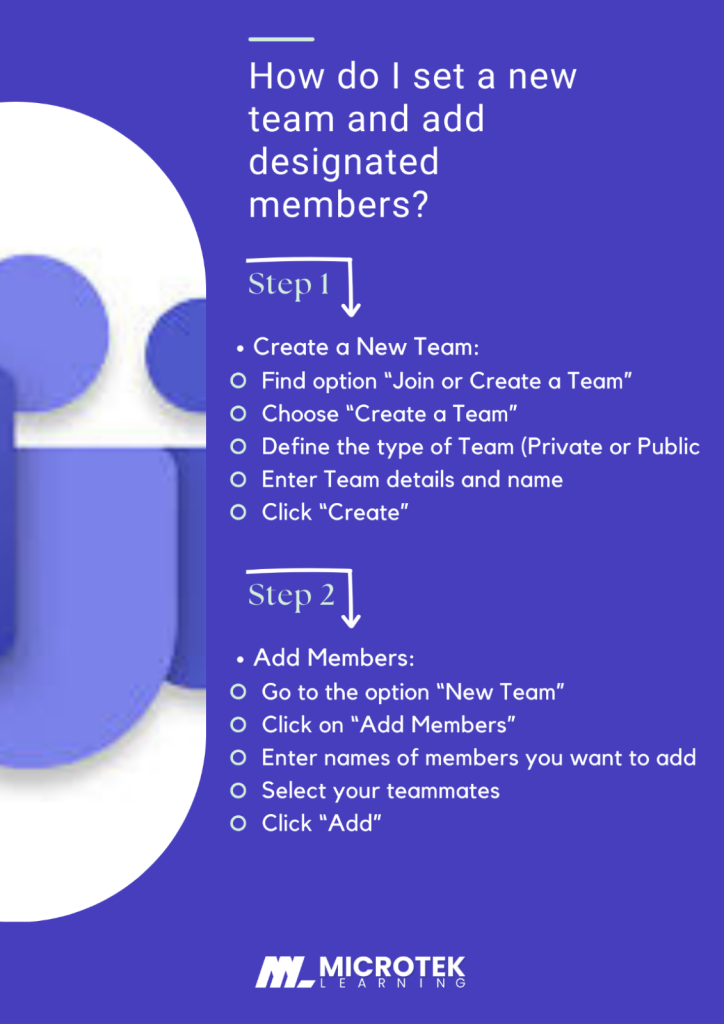
1. How do I set a new team and add designated members?
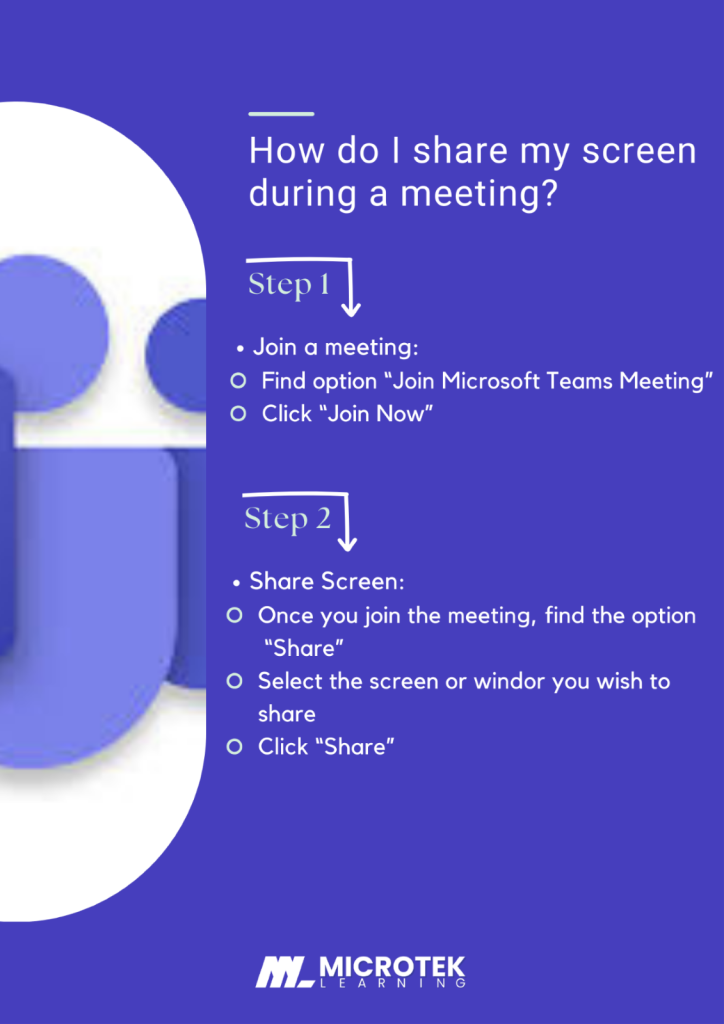
2. How do I share my screen during a meeting?
3. How can I schedule and join a virtual meeting with video and audio?

Why Choose Microsoft Teams?
Microsoft Teams adds flexibility while communicating with other teams and helps you to keep everyone on the same page regardless of their location. Its features are designed to help teams appreciate and ideate their ideas while accomplishing deadlines. But wait, this is not all; there is more about this platform that can help you make the right decision.
Pricing and Security
Although Microsoft Teams has a classic version, which is Free, there are several other plans one can consider according to their requirements and business needs.
Apart from this, from 1st April 2024, Microsoft Teams has registered as a standalone licensed product and is separated from the Microsoft 365 suite. There are several packages available for consumers to renew and upgrade their current plan. For more pricing and plans you can click here.
For security, Microsoft Teams comes with two-factor authentication; it is safe and has various measures like End-to-end encryption (E2EE), Transport Layer Security (TLS), and Microsoft Defender for keeping on top of protection.
Conclusion
In Conclusion, Microsoft Teams is the ultimate tool to be used while dealing with massive teams. Its integration with Microsoft 365 and easy-to-use features enables it to be an essential platform for businesses of all sizes.
From managing projects in the initial stage with clients’ briefs to making people understand the requirements and process, Microsoft Teams can contribute on many major levels and can result in being a promising companion. It’s designed to keep the team members on the same track while highlighting the needs and changes of the project.
Focusing on user-friendly navigation and third-party app integration, Microsoft Teams features like screen readers and live captions keep communication clear and to the point. Its capacity to hold 1000 attendees at once makes it more prominent to be used on a large scale.
To become a master of this platform, here are certifications available in the market that are provided by Microtek Learning, as we are an authorized partner of Microsoft. Given below are certifications that can make you an expert.
Hence, if you are looking for something to empower your organization’s communication system by bridging the gap and encouraging collaboration, Microsoft Teams is your answer.