


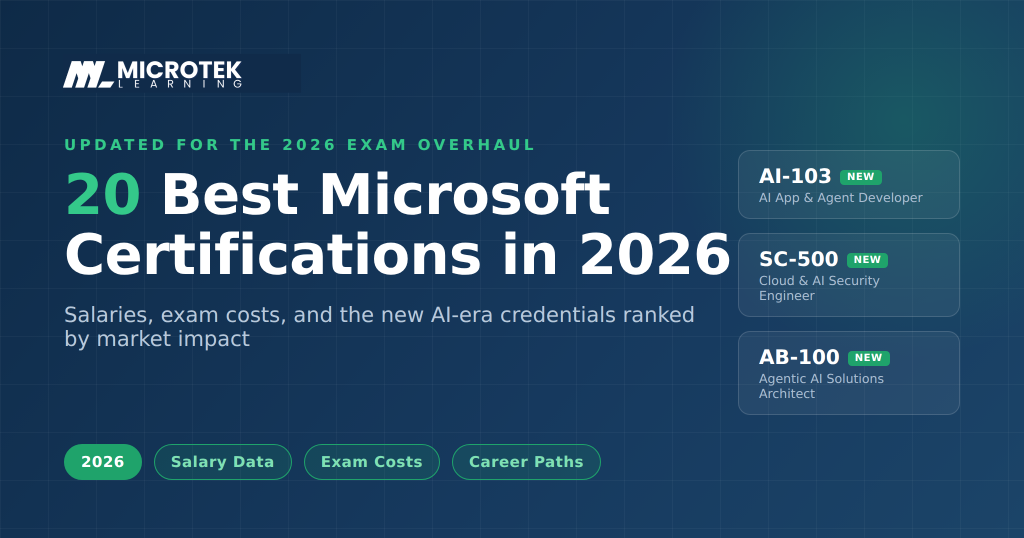
The best Microsoft certifications in 2026 are Azure AI App and Agent Developer (AI-103), Azure Administrator (AZ-104), Cloud and AI Security Engineer (SC-500), Power BI Data Analyst (PL-300), and Azure Solutions Architect Expert (AZ-305). Beginners should start with Azure Fundamentals (AZ-900) or the updated AI-901. Certified professionals earn $60,000 to $180,000 depending on role, with exams costing $99 to $165.
Microsoft Certifications remain one of the most powerful career accelerators in IT. As we move into 2026, Microsoft continues to lead the industry with role-based certifications designed for beginners, professionals, and advanced specialists alike. Whether you’re looking to increase your salary, validate in-demand skills, or stand out in a competitive job market, Microsoft Certifications give you a clear edge.
What Are Microsoft Certifications and Why Do They Matter?
Microsoft certifications are industry-recognized, role-based credentials that validate your ability to use Microsoft technologies in real-world job roles. Designed around specific career paths—such as cloud administrator, data analyst, security engineer, and developer—these certifications focus on practical skills rather than just theoretical knowledge. In simple terms, if you’re wondering what are Microsoft certifications, they are proof that you can apply Microsoft tools effectively on the job.
Benefits of Microsoft Certifications for Your Career
One of the biggest benefits of Microsoft certifications is their strong industry recognition. Employers across industries actively look for Microsoft-certified professionals because these credentials align closely with real business needs and current technology stacks. This makes Microsoft certifications highly valued by hiring managers worldwide.
Microsoft Certification Value in the Job Market
The Microsoft certification value goes beyond a resume boost. Certified professionals often see higher earning potential, faster promotions, and greater job mobility. Whether you’re aiming to switch roles, move into cloud or security, or strengthen your position in your current organization, Microsoft certifications help you stand out in a competitive IT job market.
20 Best Microsoft Certifications to Advance Your IT Career in 2026
Microsoft rebuilt its certification program this year, and most “best of” lists haven’t caught up. Between June and September 2026, twelve role-based certifications are retiring, the biggest cleanout since Microsoft moved to role-based credentials in 2019. AI-102 is gone. AZ-500 retires in August. DP-100 already retired in June. Their replacements (AI-103, SC-500, AI-300) are not renamed exams. The scope is wider and AI skills are baked into the objectives.
So this list works differently than the ones you’ll find elsewhere. We ranked by market impact: what hiring managers are actually screening for in mid-2026, which credentials survive the retirement wave, and where the salary data points. Certifications you can build a career on sit at the top. Entry points sit at the bottom. Anything marked “new for 2026” is exactly that.
1. Azure AI App and Agent Developer Associate (AI-103) (New for 2026)
The most searched Microsoft exam of the year, and for good reason. AI-103 replaced AI-102 in June and shifted the focus from wiring up AI services to building agents: systems that plan, call tools, and act on their own. Expect heavy coverage of Azure AI Foundry, RAG, function calling, and multi-agent orchestration. If you build software and want one credential that maps to where hiring is going, this is it.
Exam: AI-103 | Level: Associate | Cost: $165 | Best for: developers and AI engineers
2. Azure Administrator Associate (AZ-104)
The workhorse. Every company running Azure needs someone who can manage identities, networks, storage, and compute, and AZ-104 is how you prove you can. It survived the 2026 overhaul untouched, which tells you something about how core this role is. Still the most reliable path from IT support into a proper cloud job.
Exam: AZ-104 | Level: Associate | Cost: $165 | Best for: sysadmins moving into cloud administration
3. Cloud and AI Security Engineer Associate (SC-500) (New for 2026)
AZ-500 retires August 31, 2026, and SC-500 is its replacement. It keeps the Azure security fundamentals and adds what AZ-500 never covered: securing AI models, protecting training data, and governing AI deployments. Security roles already pay well. Security roles that include AI protection pay better, and very few people hold this credential yet. Early movers have an edge here that won’t last.
Exam: SC-500 | Level: Associate | Cost: $165 | Best for: security engineers and cloud security specialists
4. Power BI Data Analyst Associate (PL-300)
Businesses drown in data and still can’t answer basic questions about their own operations. PL-300 proves you can fix that with data modeling, DAX, and dashboards people actually use. Demand for this one has stayed strong for years because the skill gap never closed. It also stacks well with the Fabric certifications below.
Exam: PL-300 | Level: Associate | Cost: $165 | Best for: data analysts and BI professionals
5. Azure Solutions Architect Expert (AZ-305)
The senior credential for cloud careers. AZ-305 tests whether you can design entire Azure environments: compute, networking, security, cost, and governance as one coherent system. It requires real experience (AZ-104 first is the sensible route) and commands architect-level salaries, typically $130k and up in the US. Slower to earn. Worth it.
Exam: AZ-305 | Level: Expert | Cost: $165 | Best for: senior engineers targeting architect roles
6. Security Operations Analyst Associate (SC-200)
SOC teams are chronically understaffed, and SC-200 is the credential they hire against. It covers threat detection and incident response across Microsoft Sentinel and Defender, which is the security stack most enterprises actually run. If you want into cybersecurity without an architect’s decade of experience, start here.
Exam: SC-200 | Level: Associate | Cost: $165 | Best for: SOC analysts and aspiring security professionals
7. Machine Learning Operations Engineer Associate (AI-300) (New for 2026)
DP-100 retired on June 1, and AI-300 took its place with a sharper focus: not building models, but running them. CI/CD for ML, lifecycle governance, observability, drift detection. Companies learned the hard way that a model in a notebook isn’t a product. MLOps engineers are the fix, and this is now the Microsoft credential for that job.
Exam: AI-300 | Level: Associate | Cost: $165 | Best for: ML engineers and data scientists moving into production work
8. Fabric Analytics Engineer Associate (DP-600)
Microsoft Fabric is where the company is pushing its entire data platform, and DP-600 validates the analytics side: ingestion, semantic models, and pipelines inside Fabric. Adoption is climbing fast in enterprises already committed to the Microsoft stack. Pairs naturally with PL-300 if you want the full analytics profile.
Exam: DP-600 | Level: Associate | Cost: $165 | Best for: analytics engineers and senior data analysts
9. Azure AI Cloud Developer Associate (AI-200) (New for 2026)
AZ-204, the general Azure developer exam, retires July 31, 2026. AI-200 is what replaces it, and the name change is the message: Microsoft no longer thinks “cloud developer” and “AI developer” are separate jobs. The exam covers building AI-integrated applications with Azure compute, vector databases, and serverless functions. If you were planning AZ-204, plan this instead.
Exam: AI-200 | Level: Associate | Cost: $165 | Best for: application developers on Azure
10. Agentic AI Business Solutions Architect Expert (AB-100) (New for 2026)
Microsoft’s new flagship expert credential for the business applications world. With PL-600, MB-700, and several other architect certs retiring without direct replacements, AB-100 is the recommended path forward for all of them. It covers designing multi-agent AI solutions across Copilot, Foundry, and Dynamics 365. Ambitious scope, almost no certified holders yet. For consultants, that’s an opening.
Exam: AB-100 | Level: Expert | Cost: $165 | Best for: solution architects and senior consultants
11. Cybersecurity Architect Expert (SC-100)
The top of Microsoft’s security ladder. SC-100 tests whether you can design end-to-end security strategy: zero trust, governance, risk, and compliance across an entire organization. Security architects are among the best paid people in IT, with US salaries commonly reaching $140k to $180k. You’ll need an associate security cert first, and the exam assumes you’ve lived this work.
Exam: SC-100 | Level: Expert | Cost: $165 | Best for: senior security professionals
12. Identity and Access Administrator Associate (SC-300)
Identity is the new perimeter. Every breach postmortem seems to trace back to a compromised account, which is why Entra ID skills keep showing up in job listings. SC-300 covers identity management, conditional access, and identity governance. Less flashy than threat hunting, more consistently in demand than almost anything else in security.
Exam: SC-300 | Level: Associate | Cost: $165 | Best for: identity admins and IAM specialists
13. Microsoft 365 Administrator Expert (MS-102)
Someone has to run the tenant. MS-102 validates enterprise Microsoft 365 administration: identity with Entra, security, compliance, and now Copilot governance, which has become a real part of the job. Hybrid work made this role permanent, and the Copilot rollout made it strategic. Requires an associate prerequisite such as MD-102.
Exam: MS-102 | Level: Expert | Cost: $165 | Best for: senior M365 admins and systems engineers
14. Endpoint Administrator Associate (MD-102)
Underrated. MD-102 covers deploying and securing Windows devices with Intune and Autopilot, and with remote work now permanent, companies need people who can manage a laptop fleet they’ll never physically touch. It’s also the most common prerequisite for MS-102, so it does double duty in a career plan.
Exam: MD-102 | Level: Associate | Cost: $165 | Best for: desktop support pros leveling up
15. Fabric Data Engineer Associate (DP-700)
The engineering counterpart to DP-600. Where the analytics engineer builds models and reports, the data engineer builds the pipelines feeding them: ingestion, transformation, and monitoring inside Fabric. As more enterprises consolidate onto Fabric, this credential’s stock keeps rising. AI systems are only as good as the data pipelines behind them, which makes this quietly one of the safest bets on the list.
Exam: DP-700 | Level: Associate | Cost: $165 | Best for: data engineers
16. Windows Server Administrator Associate (AZ-802) (New for 2026)
The old two-exam Windows Server credential (AZ-800 plus AZ-801) consolidates into a single exam. Less glamorous than the AI certifications, but hybrid infrastructure isn’t going anywhere. Thousands of organizations still run Windows Server on-premises alongside Azure, and they need admins who can manage both sides. One exam instead of two also means half the cost.
Exam: AZ-802 | Level: Associate | Cost: $165 | Best for: infrastructure and hybrid environment admins
17. Copilot and Agent Administration Fundamentals (AB-900) (New for 2026)
A fundamentals cert that didn’t exist a year ago and now sits on a lot of job descriptions. AB-900 covers administering Microsoft 365 Copilot and managing AI agents in an organization. Companies deploying Copilot at scale discovered they need people who understand licensing, governance, and agent management. Cheap, quick, and unusually practical for a fundamentals exam.
Exam: AB-900 | Level: Fundamentals | Cost: $99 | Best for: M365 admins and IT managers overseeing Copilot rollouts
18. Azure Fundamentals (AZ-900)
Still the best first certification in IT. AZ-900 covers cloud concepts, core Azure services, and pricing with no experience required, and unlike role-based certs it never expires. Most people pass with two to four weeks of study using Microsoft’s free Learn modules. If you’re switching careers or starting out, begin here and pick your specialization after.
Exam: AZ-900 | Level: Fundamentals | Cost: $99 | Best for: beginners and career switchers
19. Azure AI Fundamentals (AI-901) (New for 2026)
The AI-900 exam was replaced by AI-901 this June, and the update matters: the new version covers building basic AI apps and agents rather than just naming what machine learning is. For anyone AI-curious without a technical background, this is the lowest-risk way to test the water. It also never expires.
Exam: AI-901 | Level: Fundamentals | Cost: $99 | Best for: beginners exploring AI careers
20. Security, Compliance, and Identity Fundamentals (SC-900)
The entry door to the security track. SC-900 introduces Microsoft’s security, compliance, and identity concepts without demanding hands-on experience. On its own it won’t get you hired, but as the first step toward SC-200 or SC-300 it gives you the vocabulary and the map. Given where security salaries sit, that map is worth $99.
Exam: SC-900 | Level: Fundamentals | Cost: $99 | Best for: anyone starting a security career path
A note on what didn’t make the list
If you’re comparing this to older rankings, some familiar names are missing on purpose. AI-102, AZ-204, AZ-500, and DP-100 are retired or retiring in 2026, and their replacements (AI-103, AI-200, SC-500, AI-300) are covered above. PL-200 retires in August, with AB-410 as its successor. Holding a retired certification doesn’t erase it from your transcript, but if you’re choosing what to study today, study the replacement.
Job Roles & Average Salaries (USA)
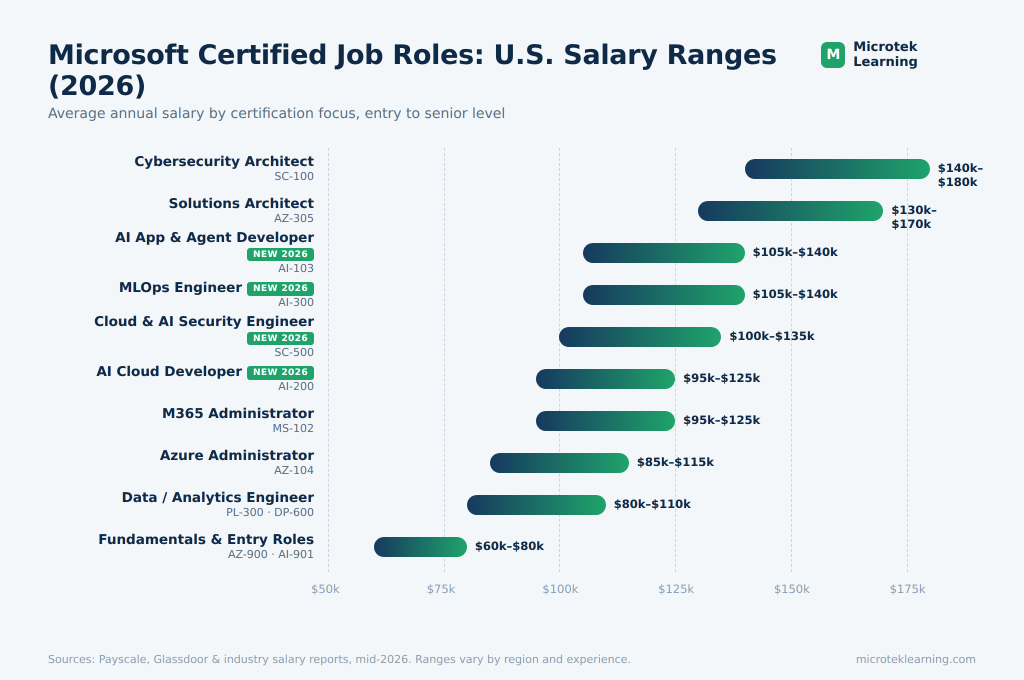
| Certification Focus | Typical Job Roles | Avg Salary (USD) |
| Fundamentals (AZ-900, DP-900, PL-900, M365, D365) | IT Support, Jr Cloud/Data Analyst | $60k – $80k |
| Power BI / Fabric | Data Analyst, Analytics Engineer | $80k – $110k |
| Azure Administrator | Cloud Administrator | $85k – $115k |
| Azure Developer | Cloud Developer | $95k – $125k |
| Data Scientist / AI | Data Scientist, AI Engineer | $105k – $140k |
| Security (SOC / Eng) | SOC Analyst, Security Engineer | $100k – $135k |
| DevOps Engineer | DevOps / Platform Engineer | $115k – $145k |
| Solutions Architect (Expert) | Cloud Architect | $130k – $170k |
| M365 Administrator (Expert) | M365 Admin | $95k – $125k |
| Cybersecurity Architect (Expert) | Security Architect | $140k – $180k |
Microsoft Certification Levels Explained
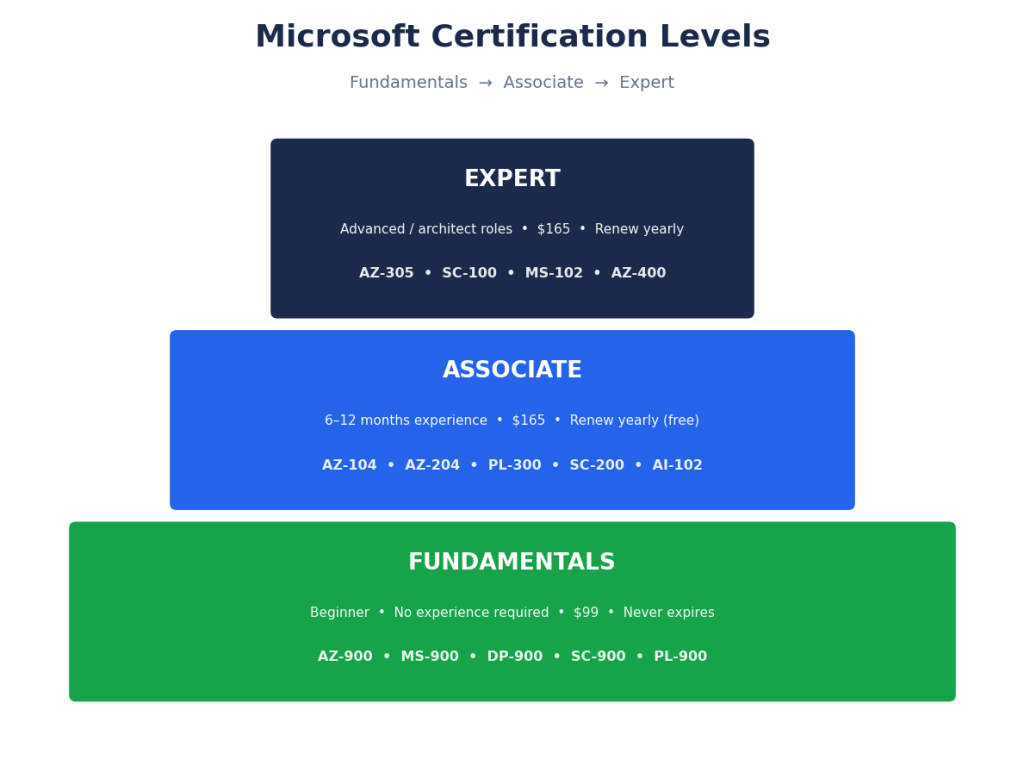
Microsoft follows a role-based certification framework that helps professionals progress step by step as their skills grow. Understanding the different Microsoft certification levels makes it easier to choose the right path based on your experience, career goals, and learning stage.
At a high level, Microsoft certifications are divided into Fundamentals, Associate, and Expert levels. This clear structure answers a common question many learners ask: Microsoft Fundamentals vs Associate vs Expert — what’s the difference? Each level builds on the previous one, allowing you to move from basic concepts to advanced, job-ready expertise.
Fundamentals Certifications (Beginner Level)
Microsoft Fundamentals certifications are designed for beginners, students, and career switchers who want to build a strong foundation in Microsoft technologies. These Microsoft beginner certifications focus on core concepts, business value, and basic technical knowledge—without requiring prior hands-on experience.
Fundamentals certifications are ideal if you’re:
- New to IT or cloud technologies
- Exploring a career path before committing to advanced certifications
- Looking to validate baseline knowledge for entry-level roles
Popular Microsoft Fundamentals Certifications
- Azure Fundamentals (AZ-900) Covers basic cloud concepts, Azure services, security, pricing, and support models. Still the most popular first certification in IT.
- Azure AI Fundamentals (AI-901) The updated version of AI-900, launched in 2026. It goes beyond naming what machine learning is and covers building basic AI apps and agents on Microsoft’s platforms.
- Copilot and Agent Administration Fundamentals (AB-900) New in 2026. Covers administering Microsoft 365 Copilot and managing AI agents across an organization. Unusually practical for a fundamentals exam, since Copilot rollouts are creating this exact job.
- Power Platform Fundamentals (PL-900) Introduces Power BI, Power Apps, and Power Automate with a business-first approach.
A note if you were planning MS-900: the Microsoft 365 Fundamentals exam retired on March 31, 2026. AB-900 is the natural replacement for anyone interested in the Microsoft 365 side, and it covers the Copilot skills employers now expect on top.
Associate-Level Certifications (Intermediate / Job-Ready)
Microsoft Associate certifications are designed for professionals with hands-on experience who want to validate role-specific, real-world skills. At this stage of the Microsoft certification levels, the focus shifts from fundamentals to execution—configuring systems, managing workloads, and solving business problems using Microsoft technologies.
These certifications are ideal if you:
- Have 6–12 months of practical experience
- Want to move into a specialized IT role
- Are targeting higher-paying, in-demand positions
Common Associate roles include:
- Azure Administrator
- Azure Developer
- Data Analyst
- Security Operations Analyst
- Power Platform Functional Consultant
Associate certifications carry strong employer demand and often act as a prerequisite for Expert-level credentials.
Expert-Level Certifications (Advanced / Architect Roles)
Microsoft Expert certifications represent the highest level in the certification hierarchy. They are built for senior professionals responsible for designing, architecting, and optimizing enterprise-scale solutions.
If you’re comparing Microsoft Fundamentals vs Associate vs Expert, this level is clearly aimed at:
- Solution Architects
- Senior Cloud Engineers
- Security Architects
- Enterprise Consultants
Expert certifications typically require:
- Deep hands-on experience
- One or more Associate certifications as prerequisites
- Strong design and decision-making skills
Earning an Expert certification significantly boosts Microsoft certification value, especially for leadership roles, consulting opportunities, and long-term career growth.
Microsoft Certification Levels: Quick Comparison
| Certification Level | Experience Required | Best For | Career Impact |
| Fundamentals | None / Beginner | Students, career switchers | Entry-level validation |
| Associate | 6–12 months | Working professionals | Job-ready skills, higher pay |
| Expert | Advanced experience | Senior & architect roles | Leadership, top-tier roles |
How to Choose the Right Microsoft Certification Level
Choosing the right path depends on your current experience and career goals:
- New to IT? Start with Microsoft Fundamentals certifications
- Already working in tech? Move directly to Associate-level
- Designing enterprise solutions? Aim for Expert certifications
Microsoft’s role-based framework—developed by Microsoft—makes it easy to progress logically while building skills employers actively seek.
Microsoft Certification Paths by Career Role
Choosing the right certification becomes much easier when you align it with your career goals. Microsoft’s role-based structure clearly defines Microsoft certification career paths, making it simple to explore Microsoft certifications by job role—from cloud and data to security and business applications.
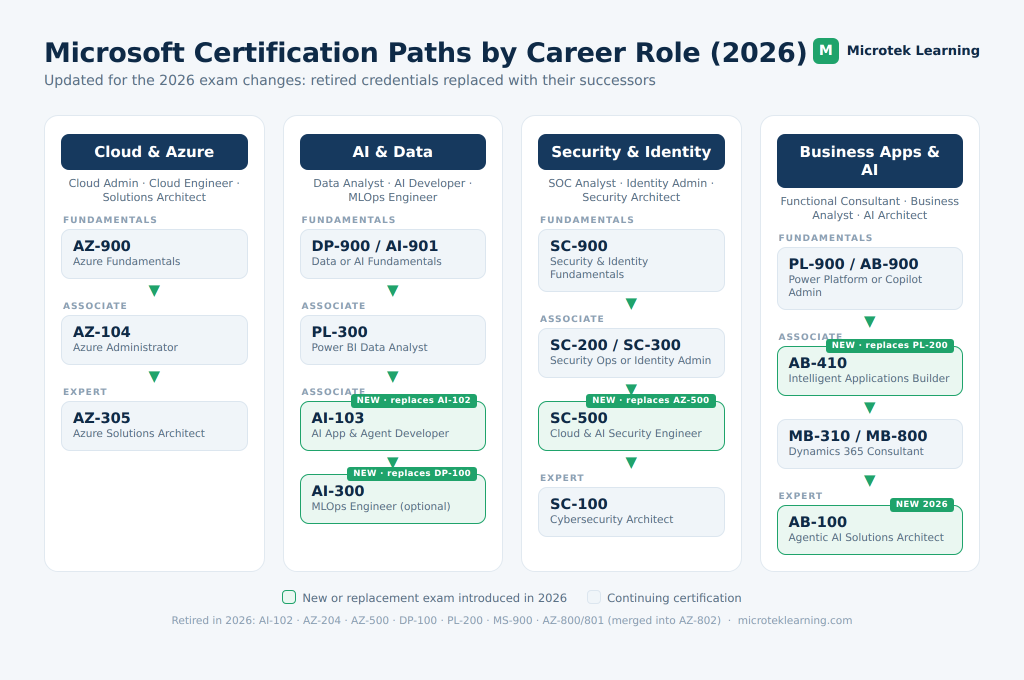
Below are the most popular Microsoft certification paths, mapped step by step for clarity and progression.
Cloud & Azure Certification Path
The Azure certification path is ideal for professionals pursuing cloud administration, engineering, or architecture roles. These Microsoft Azure certifications progress from foundational knowledge to advanced solution design.
Recommended Path:
- AZ-900 – Azure Fundamentals
- AZ-104 – Azure Administrator Associate
- AZ-305 – Azure Solutions Architect Expert
This path builds core cloud understanding first, then moves into managing Azure environments and designing enterprise-scale cloud solutions.
Data & AI Certification Path
For professionals working with analytics, business intelligence, and artificial intelligence, this path changed more than any other in 2026. AI-102 retired in June, and its replacement AI-103 shifts the focus from connecting AI services to building agents that plan, use tools, and act on their own.
Recommended Path:
- DP-900 – Azure Data Fundamentals
- PL-300 – Power BI Data Analyst Associate
- AI-103 – Azure AI App and Agent Developer Associate
If your interest leans toward running machine learning in production rather than building apps, swap AI-103 for AI-300 (Machine Learning Operations Engineer Associate), the 2026 replacement for the retired DP-100. It covers CI/CD for models, lifecycle governance, and drift detection, which is where most data science hiring has moved.
Security, Compliance & Identity Path
With growing cyber threats and regulatory requirements, Microsoft security certifications are among the most in-demand credentials. This track survived the 2026 overhaul mostly intact, with one addition worth knowing: SC-500 replaced AZ-500 as the security engineering credential, and it now covers securing AI models and deployments alongside traditional cloud security.
Recommended Path:
- SC-900 – Security, Compliance, and Identity Fundamentals
- SC-200 – Security Operations Analyst Associate
- SC-300 – Identity and Access Administrator Associate
- SC-100 – Cybersecurity Architect Expert
- SC-500 – Cloud and AI Security Engineer Associate (new for 2026)
This path prepares professionals for SOC, identity management, and security architecture roles across enterprise environments.
Business Applications & Power Platform Path
No track changed more in 2026 than this one. Microsoft is consolidating the Power Platform and Dynamics 365 credentials around AI. PL-200 retires in August with AB-410 as its successor, and the new AB-100 is now the flagship expert credential for the whole business applications world.
Recommended Path:
- PL-900 – Power Platform Fundamentals
- AB-410 – Intelligent Applications Builder Associate (replaces PL-200)
- PL-300 – Power BI Data Analyst
- MB-310 – Dynamics 365 Finance Functional Consultant
- MB-800 – Dynamics 365 Business Central Functional Consultant
- AB-100 – Agentic AI Business Solutions Architect Expert (new for 2026)
If you already hold PL-200 or one of the retiring architect certifications like PL-600 or MB-700, your credential stays on your transcript until it expires. Microsoft’s recommended next step for all of them is AB-100.
How to Choose the Right Microsoft Certification Path
When selecting from different Microsoft certification career paths, consider:
- Your current role and experience level
- The job roles you’re targeting
- Long-term growth into architect or leadership positions
Microsoft’s role-based model allows you to start small and scale strategically—making certifications a long-term investment rather than a one-time achievement.
Microsoft Certification Career Path → Role Mapping & Salary Ranges
| Career Path | Target Job Roles | Recommended Certifications | Avg. Salary Range (USD) |
|---|---|---|---|
| Cloud & Azure | Azure Administrator, Cloud Engineer, Solutions Architect | AZ-900 → AZ-104 → AZ-305 | $85,000 – $155,000 |
| AI & Data | Data Analyst, AI Developer, MLOps Engineer | DP-900 → PL-300 → AI-103 / AI-300 | $85,000 – $150,000 |
| Security, Compliance & Identity | SOC Analyst, Identity Admin, AI Security Engineer, Security Architect | SC-900 → SC-200 / SC-300 → SC-500 → SC-100 | $95,000 – $165,000 |
| Business Applications & AI Solutions | Functional Consultant, Business Analyst, AI Solutions Architect | PL-900 → AB-410 / PL-300 → AB-100 | $75,000 – $145,000 |
Microsoft Certification Exam Structure & Preparation Tips
Understanding the Microsoft certification exam format and using the right preparation strategy can significantly improve your chances of passing on the first attempt. Whether you’re new to certifications or advancing to an Expert-level exam, knowing how to prepare for Microsoft exams is just as important as the technical knowledge itself.
Exam Format & Scoring
Microsoft certification exams are designed to test real-world, role-based skills, not rote memorization. Most exams follow a consistent structure, though the exact format may vary by certification level.
Microsoft exam questions typically include:
- Multiple-choice and multiple-response questions
- Case studies and scenario-based questions
- Drag-and-drop and sequencing tasks
- Hands-on or applied problem-solving questions
The Microsoft certification passing score is generally 700 out of 1000. Exams are scored based on weighted sections, meaning some skills carry more importance than others depending on the job role being validated.
Key things to know:
- No negative marking
- Time limits vary by exam
- Questions are mapped directly to the official skills outline
Best Resources to Prepare for Microsoft Certifications
Using a mix of guided learning and hands-on practice delivers the best results. The most effective Microsoft certification training strategies focus on both understanding concepts and applying them in real environments.
Recommended preparation resources include:
- Instructor-led training
Live, structured sessions delivered by certified trainers help clarify complex topics and align learning with exam objectives. - Practice tests
Mock exams help you get familiar with question patterns, improve time management, and identify weak areas before the actual test. - Hands-on labs
Practical labs reinforce learning by allowing you to work directly with Microsoft tools and services—critical for scenario-based questions.
For a consolidated view of official and supplementary materials, explore the curated Microsoft exam prep resources, which align closely with Microsoft’s exam blueprints.
Pro Tip for Faster Exam Success
Candidates who combine Microsoft instructor-led training, practice tests, and hands-on labs typically achieve:
- Higher first-attempt pass rates
- Better confidence with scenario-based questions
- Stronger real-world job readiness
Exams and certifications offered by Microsoft are continuously updated, so following the latest exam objectives and preparation resources is essential.
Microsoft Certifications Cost, Validity & Renewal
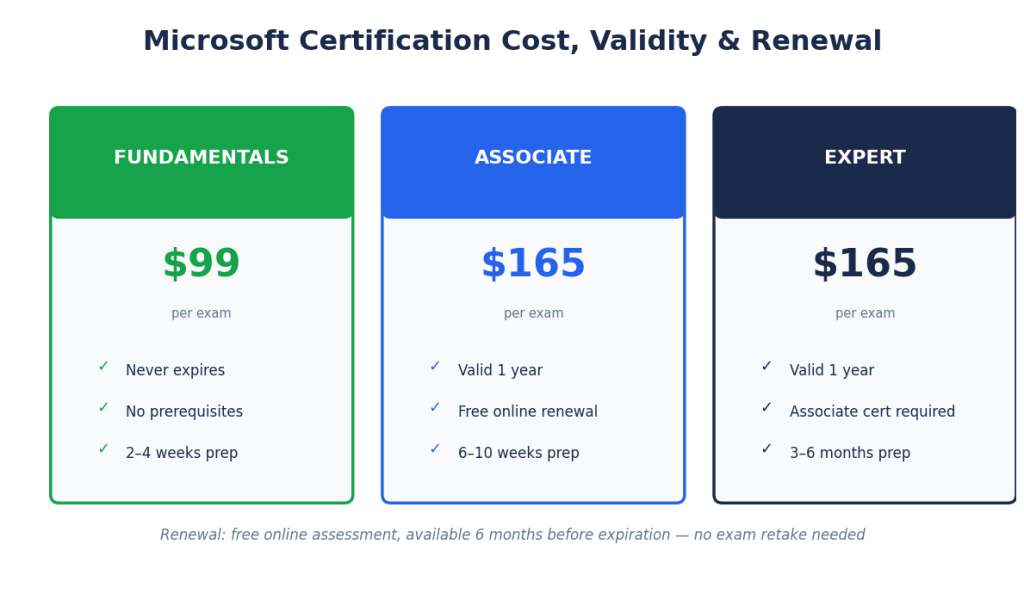
Understanding the Microsoft certification cost, how long credentials remain valid, and the Microsoft certification renewal process helps you plan your certification journey with clarity and confidence.
Exam Fees & Discounts
The Microsoft exam fees vary depending on the certification level and location, but they are structured to remain accessible across career stages.
Typical Microsoft Certification Costs
- Fundamentals exams: ~$99 USD
- Associate exams: ~$165 USD
- Expert exams: ~$165 USD
Note: Prices may vary by country and currency.
Microsoft Certification Discounts
Microsoft frequently offers Microsoft certification discounts, including:
- Student and academic discounts
- Corporate or volume-based discounts
- Training partner promotions
- Special event or challenge-based vouchers
These discounts can significantly reduce certification costs, especially when bundled with training.
Certification Validity & Renewal Process
Microsoft certifications no longer last forever. Understanding Microsoft certification expiration is critical to keeping your credentials active and relevant.
Validity Rules
- Fundamentals certifications: Do not expire
- Role-based certifications (Associate & Expert): Valid for 1 year
How to Renew Microsoft Certifications
To renew Microsoft certifications, you don’t need to retake the full exam. Instead, Microsoft offers a streamlined renewal process:
- Free, online renewal assessment
- Available within 6 months before expiration
- Focused on latest product updates and changes
- Short, unproctored assessment you can take from home
Once completed successfully, your certification is extended for another year.
Certifications issued by Microsoft are updated regularly to reflect real-world job roles, making renewal an essential step in maintaining credibility and employer trust.
Why Renewal Matters
Keeping certifications active:
- Demonstrates up-to-date skills
- Protects long-term Microsoft certification value
- Improves job mobility and promotion prospects
- Aligns your profile with evolving technologies
Microsoft Certification Cost Comparison by Career Path
| Career Path | Certification Level | Example Exams | Approx. Exam Fee (USD) |
|---|---|---|---|
| Cloud & Azure | Fundamentals | AZ-900 | $99 |
| Associate | AZ-104 / AZ-802 | $165 | |
| Expert | AZ-305 | $165 | |
| AI & Data | Fundamentals | DP-900 / AI-901 | $99 |
| Associate | PL-300 / DP-600 | $165 | |
| Associate | AI-103 / AI-300 / AI-200 | $165 | |
| Security, Compliance & Identity | Fundamentals | SC-900 | $99 |
| Associate | SC-200 / SC-300 / SC-500 | $165 | |
| Expert | SC-100 | $165 | |
| Business Apps & AI Solutions | Fundamentals | PL-900 / AB-900 | $99 |
| Associate | AB-410 / PL-300 | $165 | |
| Expert | AB-100 | $165 |
Tip: new exams typically launch in beta at an 80% discount (around $45 instead of $165). Beta slots fill fast, but if a new certification matches your role, registering early is usually worth it.
Are Microsoft Certifications Worth It in 2026?
Are Microsoft certifications worth it in 2026? For most IT professionals, the answer is a clear yes. As organizations accelerate cloud adoption, data-driven decision-making, and cybersecurity investments, Microsoft-certified professionals continue to be in high demand across industries.
Strong Job Market Demand
Microsoft technologies power a large share of enterprise IT environments worldwide. As a result, employers actively seek professionals with verified skills in Azure, Security, Data, and Business Applications. Microsoft certifications align closely with real-world job roles, making them especially valuable in today’s competitive hiring landscape.
Salary Impact & Return on Investment (ROI)
One of the biggest reasons professionals pursue certifications is Microsoft certification ROI. Compared to traditional degrees or long training programs, certifications require a relatively low investment and offer measurable returns.
Certified professionals often benefit from:
- Higher starting salaries for new roles
- Faster promotions and role transitions
- Greater leverage during salary negotiations
In many cases, the cost of a certification is recovered within the first few months of a role upgrade or job change.
Employer Preference & Career Credibility
Employers increasingly use certifications as a screening and validation tool. Microsoft certifications signal that a candidate has been assessed against current, role-based standards—not just theoretical knowledge.
Certifications issued by Microsoft also demonstrate a commitment to continuous learning, especially with annual renewals that keep skills aligned with evolving platforms and tools.
Microsoft Certifications in 2026: Pros vs Cons
| Pros | Cons |
| Strong employer recognition across industries | Requires regular renewal (Associate & Expert) |
| Direct alignment with real-world job roles | Exams test practical skills—not easy to pass without prep |
| High Microsoft certification ROI compared to cost | Training + labs require time commitment |
| Improves salary potential and promotion chances | Not a replacement for hands-on experience |
| Globally accepted and vendor-backed | Multiple exams can increase total cost |
| Flexible learning paths (cloud, data, security, business apps) | Needs continuous learning to stay current |
Bottom line: For professionals willing to invest time in structured preparation, the benefits far outweigh the drawbacks.
Real-World Hiring Manager Insights
Based on hiring trends and employer feedback across enterprise IT teams:
“When two candidates have similar experience, Microsoft certifications often become the deciding factor—especially for Azure, Security, and Data roles.”
— Cloud Hiring Manager, Enterprise IT
“Certifications tell us the candidate understands Microsoft’s best practices and current tools. It shortens onboarding time.”
— IT Infrastructure Director
“We don’t hire on certifications alone, but they significantly increase interview shortlisting—especially for mid-level roles.”
— Security Operations Manager
Certifications from Microsoft act as skill validation + trust signals, particularly in competitive job markets and consulting environments.
How to Choose the Right Microsoft Certification for You
If you’re asking which Microsoft certification should I choose, the answer depends on your background, career direction, and the skills employers are actively hiring for. Microsoft’s role-based model makes it easier to pick the right path—without wasting time or money.
1. Start With Your Experience Level
Your current skill level should guide your entry point.
- Beginners / career switchers
Start with Microsoft Fundamentals certifications, which are widely considered the best Microsoft certifications for beginners. Exams like AZ-900, DP-900, SC-900, or PL-900 build core knowledge without requiring prior hands-on experience. - Working IT professionals
If you already have practical experience, move directly to Associate-level certifications aligned with your role. - Senior professionals & architects
Choose Expert-level certifications focused on solution design and enterprise architecture.
2. Align Certifications With Your Career Goals
Different roles require different skills. Choose certifications that match where you want your career to go—not just where you are today.
- Cloud & Infrastructure roles → Azure certifications
- Data, BI & AI roles → Data Analyst and AI certifications
- Security & Compliance roles → Security and Identity certifications
- Business & Consulting roles → Power Platform and Dynamics 365 certifications
This alignment ensures stronger Microsoft certification ROI and faster career progression.
3. Consider Your Industry Focus
Your industry can influence which certification delivers the most value.
- Enterprises & IT services: Azure, Security, Identity
- Finance & operations: Dynamics 365 Finance, Power BI
- Consulting & digital transformation: Power Platform, Azure Architect
- Regulated industries: Security, Compliance, Risk-focused certifications
Choosing certifications relevant to your industry increases employer trust and job mobility.
4. Use Tools & Expert Guidance
If you’re still unsure which Microsoft certification you should choose, don’t guess.
These resources help you:
- Map certifications to career roles
- Avoid unnecessary exams
- Build a clear, step-by-step certification plan
Certifications offered by Microsoft are most effective when chosen strategically—not randomly.
Final Tip
The right Microsoft certification is the one that:
✔ Matches your experience
✔ Supports your long-term career goals
✔ Aligns with industry demand
Why Choose Microtek Learning for Microsoft Certification Training
Choosing the right Microsoft certification training provider is just as important as choosing the right certification. Your training partner directly impacts exam success, skill readiness, and long-term career outcomes. Here’s why organizations and professionals trust Microtek Learning for Microsoft instructor-led training.
Authorized Microsoft Training Partner
Microtek Learning is an authorized Microsoft training partner, delivering official, role-based Microsoft courses aligned with the latest exam objectives. This ensures:
- Training mapped directly to Microsoft certification exams
- Up-to-date curriculum reflecting current technologies
- Instruction based on Microsoft-recommended best practices
Proven Corporate & Government Training Experience
Microtek Learning has extensive experience delivering Microsoft training to:
- Enterprise organizations
- Government and public-sector agencies
- Audit, security, cloud, and data teams
This real-world exposure means training goes beyond theory—focusing on practical use cases, compliance needs, and enterprise-scale environments.
Expert-Led, Instructor-Led Training
All programs are delivered through Microsoft instructor-led training, led by certified, industry-experienced trainers who:
- Explain complex concepts clearly
- Use real-world scenarios and case studies
- Prepare learners specifically for certification exams
This approach consistently results in higher first-attempt pass rates and stronger on-the-job performance.
Custom Learning Paths Built for Your Goals
Unlike one-size-fits-all courses, Microtek Learning designs custom learning paths based on:
- Experience level (beginner to expert)
- Job role and certification path
- Individual, corporate, or team requirements
Whether you’re an individual learner planning a certification journey or an organization upskilling teams, training is structured for maximum Microsoft certification ROI.
A Training Partner You Can Trust
As a global training provider working closely with Microsoft technologies, Microtek Learning combines:
- Official curriculum
- Hands-on labs
- Exam-focused preparation
- Enterprise-grade delivery standards
What Learners & Organizations Say About Microtek Learning
⭐ Learner Testimonials
“The instructor-led Microsoft Azure training was extremely practical. Real-world scenarios and exam-focused guidance helped me clear AZ-104 on my first attempt.”
— Cloud Administrator, Enterprise IT Services
“Microtek Learning’s structured approach and hands-on labs made complex Microsoft Security concepts easy to understand. This training directly supported our team’s certification and compliance goals.”
— Security Manager, Public Sector Organization
“What stood out was the customization. The training was aligned exactly to our business use cases, not just exam objectives.”
— IT Lead, Financial Services Firm
Look for all Learner Testimonials here.
📌 Case Study Snapshot (Corporate Training)
Challenge:
An enterprise IT team needed rapid upskilling in Microsoft Azure and Security to support a cloud migration and meet compliance requirements.
Solution:
Microtek Learning delivered customized, instructor-led Microsoft certification training aligned with AZ-104 and SC-series certifications, including hands-on labs and role-specific scenarios.
Outcome:
- High first-attempt certification pass rate
- Faster cloud adoption and reduced operational risk
- Improved internal capability without hiring external consultants
This outcome-driven approach is why organizations continue to choose Microtek Learning as their Microsoft certification training provider.
Look for all Case Studies here.
Microtek Learning vs Other Microsoft Training Providers
| Criteria | Microtek Learning | Generic Training Providers |
| Microsoft Authorization | ✅ Authorized training partner | ❌ Often unofficial or mixed |
| Instructor-Led Training | ✅ Always expert-led, live | ⚠️ Often self-paced or recorded |
| Corporate & Government Experience | ✅ Strong enterprise & public-sector focus | ❌ Mostly individual learners |
| Custom Learning Paths | ✅ Role- and business-aligned | ❌ One-size-fits-all |
| Hands-On Labs | ✅ Real-world, scenario-based | ⚠️ Limited or optional |
| Exam-Focused Preparation | ✅ Mapped to latest exam objectives | ⚠️ Generic coverage |
| Post-Training Support | ✅ Guidance on next certification steps | ❌ Limited follow-up |
| ROI Focus | ✅ Skills + certification outcomes | ❌ Certification-only focus |
Why This Comparison Matters
While many providers offer Microsoft courses, Microtek Learning focuses on:
- Job-ready skills, not just exam completion
- Enterprise-scale delivery, not generic content
- Long-term certification roadmaps, not isolated exams
Training aligned with Microsoft technologies delivers the most value when it’s structured, instructor-led, and customized—and that’s where Microtek Learning stands apart.
FAQs About Microsoft Certifications
Below are answers to the most common Microsoft certification FAQs, designed to address real Microsoft certification questions from beginners and working professionals alike.
How long does it take to get Microsoft certified?
The time required depends on your experience level and the certification you choose. Fundamentals certifications like AZ-900 or AI-901 take 2 to 4 weeks of preparation. Associate-level exams such as AZ-104, AI-103, or SC-500 take 6 to 10 weeks with structured study and hands-on labs. Expert-level certifications like AZ-305 or AB-100 take 3 to 6 months, depending on prior experience. Budget extra time for the new 2026 exams, since their scope is wider than the credentials they replaced.
Can beginners start with Microsoft certifications?
Yes, when you pick the right entry point. Fundamentals certifications are built for students, career switchers, and non-technical professionals, with no hands-on experience required. The strongest starting options in 2026 are AZ-900 for cloud, AI-901 for artificial intelligence, SC-900 for security, and AB-900 if your interest is Microsoft 365 Copilot administration. AB-900 is worth a special mention: it didn’t exist a year ago and now shows up in job descriptions, because companies rolling out Copilot need people who understand agent governance.
Do Microsoft certifications expire?
Most do, but not all. Fundamentals certifications (AZ-900, AI-901, SC-900, PL-900, AB-900) never expire. Associate and Expert certifications are valid for one year and renew through a free online assessment available within six months of expiration. One 2026 wrinkle: if your certification’s exam has retired, you usually cannot renew through the old assessment and will need the replacement credential instead.
Are Microsoft certifications difficult to pass?
Microsoft exams are role-based and scenario-driven, so they test practical skills rather than memorization. Difficulty depends on your hands-on experience, the certification level, and the quality of your preparation. Fundamentals exams are approachable for beginners. The new 2026 exams (AI-103, SC-500, AI-200, AI-300) run noticeably harder than the ones they replaced, because they assume working AI skills on top of the original domain. Structured instructor-led training, labs, and practice tests close that gap for most candidates.
Can I take Microsoft certification exams online?
Yes. Microsoft offers online proctored exams you can take from home and in-person testing at authorized centers. Both formats follow the same structure, scoring, and security standards.
How many times can I retake a Microsoft certification exam?
If you don’t pass on the first attempt, you can retake the exam after a 24-hour waiting period. Later retakes may require a longer wait, and each attempt means paying the exam fee again. There’s no lifetime limit, but one caution for 2026: if an exam is retiring, its retirement date is a hard deadline. Failed attempts close to that date may leave no room for a retake, which is another argument for starting with the replacement exam instead.
Are Microsoft certifications globally recognized?
Yes. Microsoft certifications are accepted by enterprises, government organizations, consulting firms, and cloud service providers worldwide, and they carry strong credibility across regions and industries.
Do Microsoft certifications help with job placement?
Certifications don’t guarantee jobs, but they measurably improve resume shortlisting, interview callbacks, and credibility in technical discussions. Many employers treat them as a preferred or mandatory requirement for cloud, security, and data roles. The effect is strongest right now for the new AI credentials, where demand for verified skills is running ahead of the number of people who hold them.
Which Microsoft certification is best for career switching?
For career switchers, the lowest-risk starting options are AZ-900 (cloud fundamentals), AI-901 (AI fundamentals), SC-900 (security fundamentals), and PL-900 (Power Platform fundamentals). Each provides an inexpensive entry into IT and helps you pick a long-term specialization before committing to associate-level study. If you’re switching careers specifically because of AI, start with AI-901 and aim for AI-103 or AI-300 once you have some hands-on practice.
Is hands-on experience required before taking the exam?
Fundamentals exams require none. Associate and Expert exams strongly assume it, and the new 2026 exams even more so: AI-103 expects you to have actually built with Azure AI Foundry, and SC-500 expects real exposure to securing cloud workloads. Hands-on labs are the most reliable way to build that confidence before test day.
Can one certification lead to another?
Yes, the whole framework is progressive: Fundamentals, then Associate, then Expert. A typical 2026 path looks like AZ-900 → AZ-104 → AZ-305 for cloud, or AI-901 → AI-103 → AB-100 for AI roles. Expert certifications usually require an associate-level prerequisite, so check that yours isn’t a retiring exam. Microsoft is updating prerequisite lists as certifications retire, replacing old credentials with their successors.
Are Microsoft certifications better than other vendor certifications?
They’re the strongest choice if your work involves Azure, Microsoft 365, Power Platform, Dynamics 365, or enterprise security and identity, which describes most enterprise IT environments. If your stack is AWS or Google Cloud, those vendors’ credentials fit better. The honest answer is that the best certification follows your technology stack and career goals, not the vendor’s brand.
Which Microsoft certifications are retiring in 2026?
Microsoft is retiring twelve role-based certifications between June and September 2026, the largest overhaul since the move to role-based credentials in 2019. The major ones: AI-102 retired June 30, AZ-204 retires July 31, AZ-500 retires August 31, and DP-100 retired June 1. AZ-800 and AZ-801 consolidate into a single AZ-802 exam by September 30. Several Power Platform and Dynamics 365 certifications, including PL-200, PL-600, and MB-700, are also retiring.
What replaces AI-102, AZ-500, and the other retired exams?
Each major retirement has a designated successor: AI-103 replaces AI-102, SC-500 replaces AZ-500, AI-200 replaces AZ-204, AI-300 replaces DP-100, AZ-802 replaces the AZ-800/801 pair, and AB-410 replaces PL-200. These are not renamed exams. The scope is broader and AI skills are built into the objectives, so plan extra preparation time even if you knew the old material well.
Is my retired certification still valid?
Yes. Retirement affects the exam, not credentials already earned. A retired certification stays on your transcript until its normal expiration date. The catch is renewal: once an exam retires, you generally cannot renew that certification through the original assessment, so you’ll need to earn the replacement credential to stay current. One exception is Windows Server, where holders of the old AZ-800/801 certification can renew through the AZ-802 assessment.
Should I take a retiring exam or wait for the replacement?
It depends on how far along you are. If you’re 70 to 80 percent prepared for a retiring exam, finish it before the retirement date, since the credential goes on your transcript permanently. If you’re starting from scratch, study the replacement instead. It stays renewable, and being an early holder of a new certification carries weight with hiring managers.
Ready to Get Microsoft Certified?
If you’ve made it this far, you’re serious about advancing your career. Now it’s time to take action and enroll in Microsoft certification training that delivers real results—not just exam preparation.
Whether you’re a beginner or an experienced professional, our Microsoft certification courses online are designed to help you pass exams faster and apply skills confidently on the job.
Why Take the Next Step Now?
- ✔ Instructor-led, exam-aligned training
- ✔ Hands-on labs and real-world scenarios
- ✔ Custom learning paths based on your role and experience
- ✔ Trusted by enterprises and government organizations
All programs are aligned with certifications from Microsoft, ensuring your skills stay current and job-relevant.
Your Career. Your Certification. Your Move.
Don’t guess your next step—choose the right Microsoft certification and start building measurable career growth today.